Scatha: A Homelab on a 2013 Mac Pro
Proxmox, a WireGuard mesh, split DNS and 3-2-1 backups on a twelve-year-old workstation
Published on October 7, 2026
Since June 2026, the services I self-host at home — photos, documents, Git, media, home automation, a few game servers — run on Scatha, a Mac Pro 6,1 (Late 2013, the “trashcan”) running Proxmox VE on bare metal. (All my machines are named after Tolkien’s dragons.) It is the third machine to host this stack — more on that below. In August the Mac Pro got a Xeon E5-2697 v2 (12 cores, 24 threads) and 64 GiB of ECC RAM.
Its two FirePro D500 GPUs already got two posts of their own (the passthrough guide and the kernel bug hunt). This one is about everything else: how the server is organized, how it sits on the network, and how it is backed up, monitored and documented.
Numbers at a Glance
36
containers running in the main stack
~490 GB
of photos and personal archive under 3-2-1 backup
0
services reachable from the public internet
960+
commits in the repository that documents it all
How it got here
The first attempt ran on Smaug, a Particle Tachyon — a single-board computer built around a Qualcomm QCM6490 (ARM) — with an ADATA Legend 700 NVMe drive attached through Pimoroni’s NVMe Base, a board that connects the drive over a PCIe flat cable. That cable turned out to be the weak point. The link ran on a single PCIe lane, and its marginal signal produced a steady stream of correctable PCIe errors; combined with ASPM, the link’s power-saving mode, interrupts were occasionally lost, the drive stalled on I/O timeouts, and under heavy load (Docker, machine learning and photo uploads at the same time) the board rebooted on its own. Disabling ASPM L1 and shortening the I/O timeout tamed the symptoms, but the errors themselves never went away: they came from the cable, not from the software.
The stack then moved to a Mac Mini M2 under OrbStack. But on ARM the machine-learning side of my photo library ran under x86 emulation, so in June 2026 it moved again, to native x86 on Scatha. Nothing from the first attempt went to waste: the Legend 700 bought for the Tachyon followed every move and is now Scatha’s fast disk, holding the photo library and Docker’s storage — and Smaug found two jobs it is good at: cellular fallback for the internet link and off-host backup target, both described further down.
How it is organized
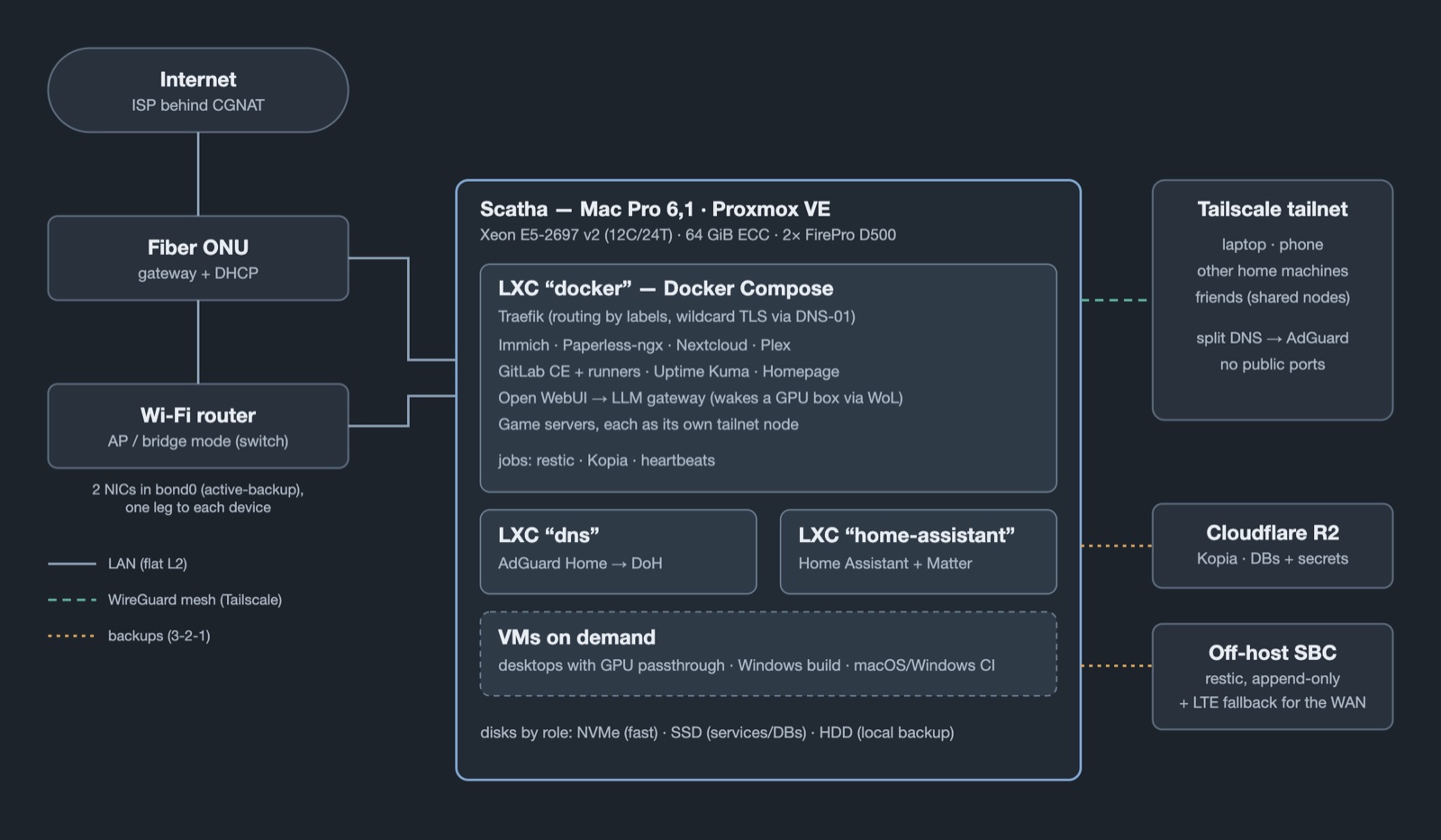
Overview of the setup: the LAN on the left, the server in the middle, remote access and backup destinations on the right.
Proxmox splits the machine into a few LXC containers (lighter than VMs, sharing the host kernel) and some VMs that only start when needed:
- “docker” — the main stack, with one Docker Compose file per service: Immich (photos), Paperless-ngx (documents), Nextcloud, Plex, GitLab CE with its CI runners, Uptime Kuma, a dashboard, an Open WebUI front end whose gateway wakes my GPU desktop over Wake-on-LAN when someone starts a chat with a local LLM, and game servers. Traefik sits in front of all of it and routes by Docker labels, so adding a service doesn’t mean publishing a port.
- “dns” — AdGuard Home, kept apart from the Docker stack, so that DNS, which everything else depends on, doesn’t share its fate.
- “home-assistant” — Home Assistant plus a Matter server.
- On-demand VMs — Linux and macOS desktops using GPU passthrough on the physical monitor, a Windows build machine, and macOS/Windows VMs that act as CI runners.
Storage is split across three disks by role, not by convenience: an NVMe for what needs to be fast (the photo library and Docker’s own storage), an SSD for active services and databases, and a mechanical HDD that only holds the local backup repository.
The network
This is the part that taught me the most. The home network itself is simple: one flat LAN, where the ISP’s fiber ONU is the gateway and DHCP server, and the Wi-Fi router runs in access point (bridge) mode, acting only as a switch and Wi-Fi. Most of the work went into what sits on top of it.
Two links, two devices
The Mac Pro has two Gigabit Ethernet ports, and both are in a Linux bond in active-backup mode. Each leg goes to a different device — one to the Wi-Fi router, one straight into the ONU — so neither the cable, the port nor the switch is a single point of failure. Both legs share the same forced MAC address, which keeps the server’s DHCP reservation, and therefore its IP, stable whichever leg is active. I tested the failover live, by pulling cables, and confirmed it survives a reboot.
It has known limits, written down rather than ignored: link monitoring
(miimon) only notices a dead link, not a router that is alive but lost its uplink
(ARP monitoring would catch that, at the cost of more complexity with the Proxmox bridge on
top); and the ONU itself remains a single point of failure for the LAN. For the internet link,
though, there is a way out.
A cellular fallback for the internet link
Smaug, the single-board computer from the first attempt, has a built-in LTE modem. When the wired ISP goes down, the server and its two key containers (the main stack and the DNS) switch their default route to Smaug over the LAN, and Smaug forwards that traffic through the modem with source-based policy routing — only traffic coming from the server takes the cellular path. Measured: about 48 Mbps and 270 ms, enough for Tailscale to reconnect through the carrier and give me remote access back while the home connection is dead.
The switch is automatic, because a manual one has an obvious hole: with the house offline, I can’t reach the server to flip it. A timer checks the uplink every two minutes and only switches after three consecutive failures — consecutive, not cumulative, so scattered hiccups over a day never add up to a false alarm. Going back is just as deliberate: it happens when the wired ISP actually answers again, never after a fixed time, which would only send the server back to a dead gateway. The caution has a reason: the cellular plan has a data cap, and a nightly cloud backup or a container image pull would eat it without anyone asking. Getting there meant clearing three traps along the way: ICMP redirects quietly steering the server back to the dead gateway, a carrier that drops ICMP (so the connectivity test has to use HTTPS), and a carrier-side gateway that changes, so it is read from Smaug every time instead of hardcoded.
Remote access without opening ports
My ISP puts customers behind CGNAT: the public IPv4 address is shared with other customers, so port forwarding on the router can’t work anyway. Instead, every remote access goes through Tailscale, a mesh VPN built on WireGuard: my laptop and phone reach the services as if they were at home, and nothing is exposed to the internet.
Game servers get an extra touch. Each one runs with a small sidecar container that joins the tailnet as its own node and forwards traffic to the game through DNAT. That makes it possible to share only that node with a friend’s Tailscale account — they can join the game, and they can’t see anything else on my network.
DNS: measured, not guessed
AdGuard Home resolves names for the whole house, blocks ads and trackers, and forwards queries upstream over DNS-over-HTTPS to Quad9. After the upstream failed 105 times in a week, it got a fallback — DoH from a different provider (Cloudflare), never the ISP’s resolver, so the redundancy is real.
Before tuning anything, I measured: an internal name or a cache hit answers in 0 ms, and a cold miss in 52 ms, against a 54.7 ms round trip to Quad9 — in other words, a query already costs exactly one round trip, which is the physical floor. That ruled out several “optimizations”: changing the transport, switching providers, and querying two upstreams in parallel, which would trim the slow tail but send every cold query to a second company, a real privacy cost for a cosmetic gain. The one setting that mattered was a minimum cache TTL of 60 s — and not more, because Steam’s CDN uses a 1-second TTL for load balancing and the game servers update through it on every boot.
Not trusting the ISP’s resolver
One night the ONU’s DNS resolver went silent for 48 minutes while IP
connectivity stayed up — and took that day’s off-site backup down with it. Since then the
host and the main container resolve through AdGuard, with Quad9 as a direct fallback, pinned in
the DHCP client configuration instead of resolv.conf (which the DHCP client rewrites
on every lease renewal). That change taught its own lesson: the DHCP client only reads its
configuration when it starts, so validating right after editing proves nothing — it
cost me an hour with the server off the network before the procedure was right.
Names and certificates
Tailscale’s split DNS sends my internal domains to AdGuard, which points them at Traefik. Traefik holds a wildcard Let’s Encrypt certificate obtained through the DNS-01 challenge, which proves domain ownership through a DNS record instead of an HTTP request — so services that never touch the public internet still get valid HTTPS.
Changing the network remotely without locking yourself out
Editing the network configuration of a machine over SSH is a good way to lose access to it. Before applying any change, I arm a timer that automatically restores the previous configuration after five minutes, apply the change detached from the SSH session, and only cancel the timer after logging back in through a fresh connection. If everything else fails, the host is still reachable through its IPv6 link-local address, which does not depend on DHCP at all.
Backups: 3-2-1, and checking that they restore
Two complementary systems, each matched to the kind of data it protects:
- Kopia → Cloudflare R2, daily: database dumps and secrets — small, and expensive to rebuild. It retries three times before alerting, because a network hiccup used to cost a whole day’s backup.
- restic, nightly, to the local HDD, plus a daily copy to an append-only REST server on Smaug, the single-board computer from the first attempt, over Tailscale. Append-only means that even if the main server were compromised, it could not delete the remote snapshots. This covers the ~490 GB of photos and personal archive.
There is also a restore drill, because a backup that was never restored is only a hypothesis.
The most interesting problem here wasn’t a failure but growth: the local
repository started gaining around 10 GiB per day with no new data to justify it. Comparing
snapshots pointed to two culprits. Database dumps were being re-uploaded almost entirely every
night, because pg_dump writes rows in their physical order, which constant updates keep
reshuffling, so deduplication can’t help; they belonged to the other backup system anyway, and
left this one. And GitLab’s own backup archive carried 13 GB of CI artifacts under a new file name
every day; skipping artifacts shrank it from 15.2 to 2.8 GB, with the code itself
still fully covered.
Monitoring in two layers
The internal layer is Uptime Kuma, which watches services, containers and backups and alerts on Telegram. But it lives on the very machine it watches — if the whole server dies, it dies silently with it. So there is an external layer: healthchecks.io receives a heartbeat from the host and from the main container every 15 minutes, plus a ping from each backup when it completes. If the heartbeats stop, the alert comes from outside, and which of them stopped already narrows down the cause.
Documentation as part of the system
The whole setup lives in a Git repository hosted on the server’s own GitLab: Compose files, scripts, systemd units, and above all documentation — an operational reference, runbooks, incident write-ups, and a design document before every non-trivial change (dozens of them by now). When a statement in the docs turns out to have aged — a machine described as offline that is actually back, a fix described as solving a problem it didn’t solve — the correction is recorded explicitly, instead of silently rewriting history.
What stuck with me
- Measure before optimizing. The DNS was already at the physical floor; the measurement saved me from three changes that would only have added risk.
- Redundancy has to be independent. A DNS fallback through the same ISP, or a monitor living on the machine it monitors, only looks like redundancy.
- Always keep a way back. An automatic revert timer and a link-local address turned risky remote network changes into routine ones.
- Write down the limits. Knowing exactly what the bond does not cover is as useful as knowing what it does.
Links
- GPU Passthrough on a Mac Pro 6,1 — the desktop VMs on the physical monitor
- The GPU That Refused to Shift Gears — a kernel regression found on this same server
- Adventures with Local LLMs — the local models behind the chat front end
A note on how this was written: the setup, decisions, and measurements described above are my own; much of the hands-on operation was carried out with Claude Code as an assistant, under my direction. The writing itself was drafted and edited with the help of generative AI (Claude), based on my notes and the repository’s real history.